The Day My Vacation Photos Gave Away My Home Address
Three years ago, I posted a photo album from a trip to Flickr. Just casual travel shots, nothing special. A week later, a security researcher friend messaged me: "Nice photos. I can see exactly where you live." He'd pulled GPS coordinates from my unedited JPEGs and pinpointed my address within minutes. My stomach dropped.
That's when I started paying attention to EXIF metadata. Every smartphone and camera embeds hidden data in photos: GPS coordinates, timestamps, device make and model, software versions. This junk persists through most sharing workflows unless you actively strip it.
For most people it's an abstract privacy risk. For journalists in sensitive regions or anyone fleeing a bad situation, it can be life-threatening. After struggling with existing tools that were clunky, required uploading to unknown servers, or just didn't work, I built my own.
Building the Tool I Actually Needed
A client once needed product photos cleaned of all location data before uploading to their CMS. Their legal team was strict about it. I tried several online tools—some wanted me to create an account first, others uploaded my images to their servers (ironic for a privacy tool), and a few just didn't work at all. The ones that did work often re-compressed the images and degraded quality.
I'm a developer, so eventually I just wrote a script using exif-js v2.3.0 to strip metadata locally in the browser. No server, no uploads, complete privacy. It worked well enough that I built a proper UI around it. The result handles batch processing, shows exactly what metadata each image contains, and preserves original image quality.
Everything happens in your browser. Your photos never leave your device. If someone intercepts your traffic, they see nothing because the processing is JavaScript running locally.
How EXIF Actually Works
EXIF (Exchangeable Image File Format) is a standard for storing metadata in images. When you snap a photo, the camera writes data into specific segments of the JPEG file. GPS coordinates go into TIFF tags that any software can read if it knows where to look.
Here's what surprised me: different platforms handle this differently. iPhones embed detailed location data by default. Android varies by manufacturer and settings. Professional cameras often embed way more metadata than consumer devices—lens serial numbers, shooting conditions, exact equipment used.
The exif-js library parses these metadata segments using Piexifjs under the hood, which handles the messy binary parsing. When we strip metadata, we take the raw image data and write it as a clean JPEG without those segments. Image quality stays identical—the only thing gone is the hidden metadata.
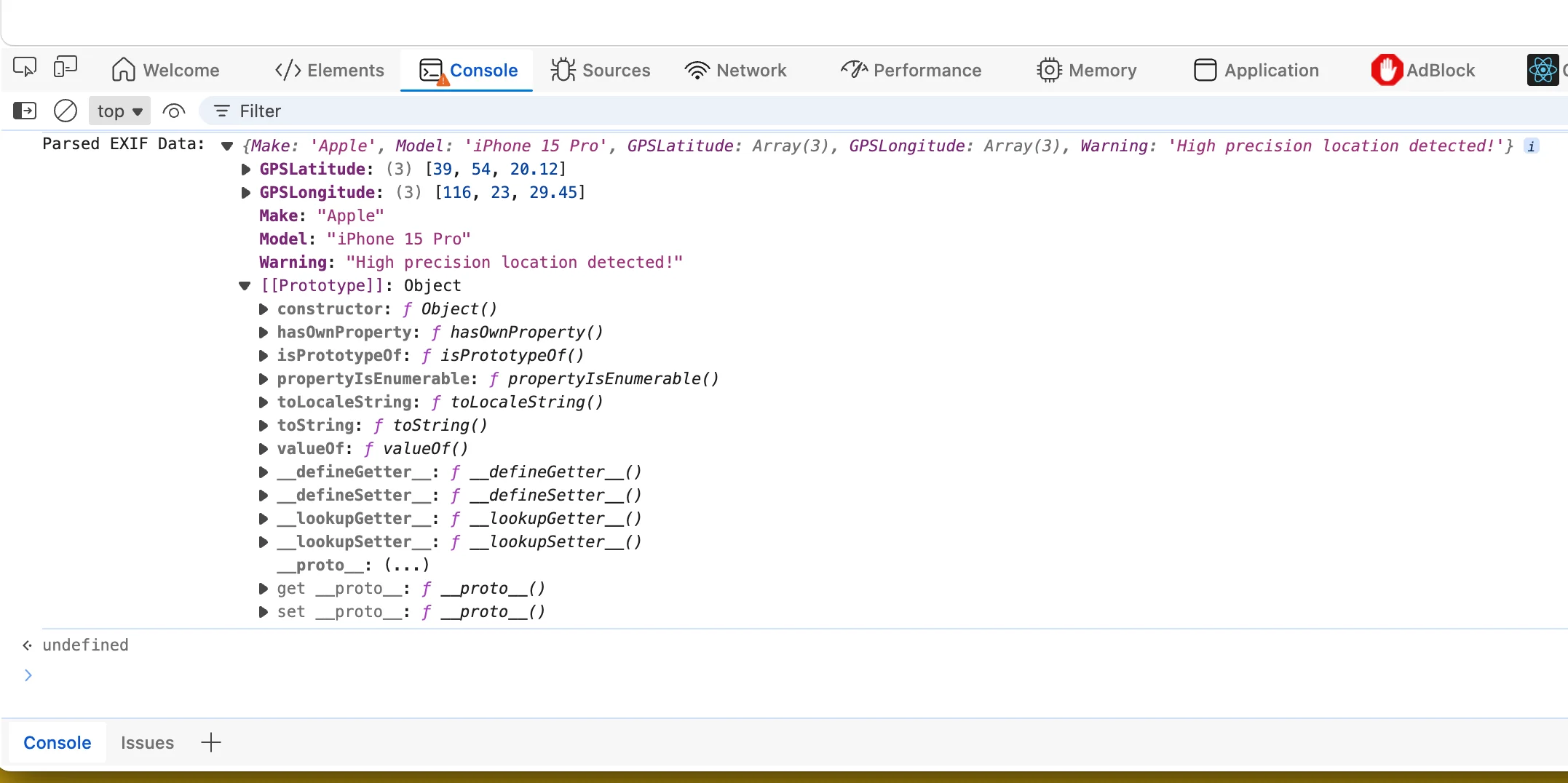
Common metadata found in photos:
- GPS coordinates—exact location where photo was taken
- Timestamp—when the photo was captured
- Device info—camera or phone make and model
- Software version—what edited the image
- Lens serial number—on professional cameras
Problems I Ran Into
PNG files don't natively support EXIF. They use their own metadata format (tEXt, iTXt, zTXt chunks). A single library can't handle both without special-case logic. My cleaner detects file type and uses the appropriate approach for each.
Some tools re-compress images during processing. For print or professional use, this is a problem—you can see the quality loss. My approach preserves the original compression. I'm not re-encoding, just extracting and re-writing the clean pixel data.
Batch processing creates memory issues. Process 50 photos at once and browser tabs crash if you're not careful. I had to implement streaming processing that handles files one at a time without loading everything into memory simultaneously.
Not all metadata is bad. Camera settings like aperture and shutter speed are useful for photographers learning their craft. The right approach isn't removing everything—it's removing the sensitive personal information while preserving what's professionally valuable.
How I Actually Use This
Before any photos go to social media or cloud storage, they get processed through the cleaner. I keep originals with full metadata on an encrypted external drive—professional work needs those timestamps and camera settings. But the versions that travel beyond my control get stripped every time.
I've also changed my own camera defaults. On iPhone, GPS tagging is on by default but buried deep in Settings → Privacy → Location Services → Camera. I keep it off and only enable it when I'm specifically taking photos where I want location tracking. Most people never even know this data exists.
Metadata exposure is passive. You don't have to do anything wrong to leak information. A burglar checks your vacation photos, sees you're away. A stalker analyzes your morning routine from breakfast shots. This tool won't solve every privacy problem, but it removes one entire category of risk with basically no effort.
Written by OldBig, a full-stack developer with 8 years building privacy-focused tools. Built the EXIF cleaner after personally experiencing what happens when you share photos without checking what's hidden in them.
Written by Bai Shuang, a full-stack engineer with 16 years of Java/JavaScript experience, 10 years of Scala, and 8 years specializing in privacy-focused tools.
GitHub: @oldbig. Open source project: redux-lite - A lightweight React state management solution.