The Link That Looked Like Crap on Twitter
I spent three hours writing a blog post about something I was proud of. Posted it on Twitter. The link showed up as a tiny gray box with no image, just the URL in text. Zero clicks that first day. Zero. I felt like an idiot.
That's when I learned about Open Graph meta tags. When you share a link on Facebook, Twitter, LinkedIn, or any platform, they fetch a preview. Title, description, image. Without the right tags, platforms guess at your content—often badly. A bad preview kills click-through rates. Facebook's data shows posts with images get 2.3x more engagement than text-only posts.
I built the meta tags tool because I kept needing to generate these for different frameworks. Next.js has its own metadata API. Plain HTML needs direct meta tags. React/Vue projects often want JSX format. I got tired of remembering the syntax for each.
How Open Graph Actually Works
Open Graph was originally Facebook's protocol but now every platform uses it. When someone shares your URL, the platform's crawler hits your page and reads specific meta tags from your HTML head. Those values populate the preview card.
The four essential tags:
- og:title— Your content's title. Shows in the blue link text on most platforms.
- og:description— The pitch. 150-160 characters works best. Write it like you're trying to get someone to click.
- og:image — The visual. This matters most. Posts with relevant images get way more engagement.
- og:url — The canonical URL. Important for analytics and sharing consistency.
The image is where most people mess up. Use 1200x630 pixels for best results across platforms. This is the minimum size that looks good on retina displays. Smaller images get upscaled and look blurry.
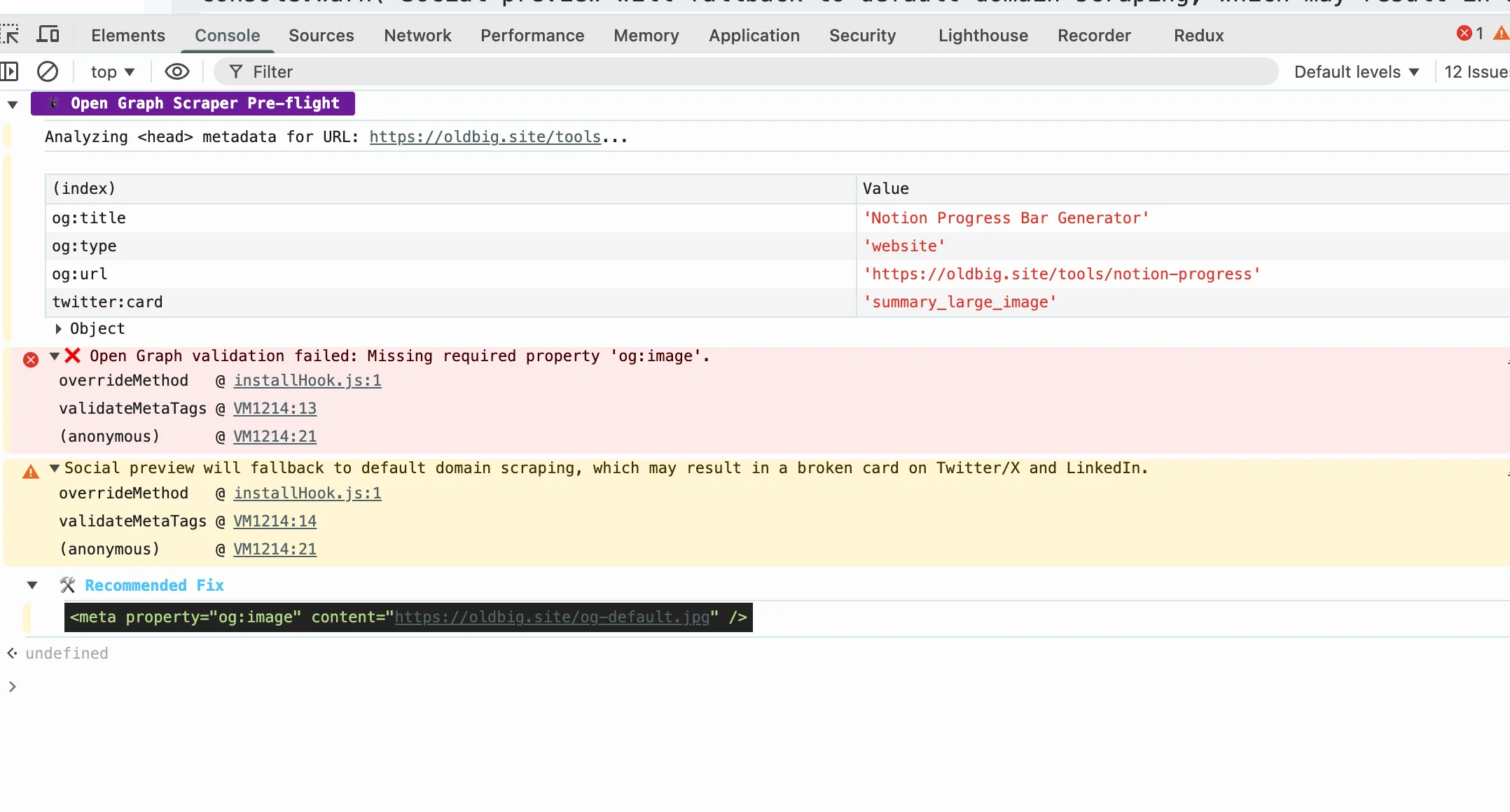
og:image and the social platform scraper just refused to work.Twitter Cards Are Separate
Here's what tripped me up initially: Twitter doesn't use Open Graph. They have their own Card meta tags that do similar things but with different names. If you only set og: tags, Twitter might show something completely different than Facebook.
The twitter:card tag specifies the card type. summary_large_image gives you the big image preview that works best for most content. summary is the smaller version.
Most tools generate both sets. That's what I do here too—you want both Open Graph and Twitter tags so you look good everywhere.
Framework quirks
Plain HTML projects: you just paste the meta tags directly into your head section. Easy.
Next.js projects: use the Metadata API. Export a metadata object from your page file. Next.js handles the rendering and ensures the tags go in the right place. Much cleaner than manual tags, and it handles defaults automatically.
React/Vue/Svelte projects: JSX-style meta tags work but can vary by library. react-helmet, next-head, and @nuxtjs/meta all have different APIs. The generator here outputs code for each.
What Makes a Good Preview
Title: under 60 characters. Platform truncates longer ones with ellipsis. Make every character count.
Description: 150-160 characters. Lead with the value—what will someone get from clicking? Don't be vague.
Image: 1200x630 minimum. No text overlays—they get stripped on most platforms. Use a clean design with a focal point that reads well at small sizes.
Accuracy: the preview must match the content. Platforms cache previews and misleads get reported. If you promise something in your meta description, the page better deliver.
Testing Your Tags
Always test before publishing. Facebook has its Sharing Debugger. Twitter has the Card Validator. Both let you preview exactly what will show and flag errors. I test every new page with both before announcing anything publicly.
The tools also show when tags are missing or misconfigured. Common issues: cached old versions (force refetch in the debuggers), HTTP vs HTTPS mismatches (platforms block insecure content in previews), and image size below minimums.
Common Questions
Do I need both Open Graph and Twitter tags? Yes. Facebook, LinkedIn, and Pinterest use Open Graph. Twitter uses its own Card tags. Both are necessary for full coverage.
Can I use the same image everywhere? One 1200x630px image works across all platforms. Just reference it in both og:image and twitter:image.
What if I skip meta tags?Platforms will guess. You'll get whatever image the crawler finds first, often nothing relevant. Your click-through rate will suffer.
Written by Bai Shuang, a full-stack engineer with 16 years of Java/JavaScript experience, 10 years of Scala, and 8 years specializing in privacy-focused tools.
GitHub: @oldbig. Open source project: redux-lite - A lightweight React state management solution.