The Morning I Realized I'd Been Sharing WiFi Passwords Wrong
I used to just dictate my WiFi password to guests. "Capital T, lowercase p, numbers..." By the third repetition I was annoyed and they were embarrassed. Then I discovered QR-code-based WiFi sharing and wondered why I hadn't done this years ago.
Most QR code generators send your data to their servers. The URL or text you encode gets logged somewhere. For WiFi credentials especially, that's a problem—you really don't want your network password stored on some server you don't control. So I built this one instead. Everything stays in your browser. Your data never touches my server.
I've been using it daily for over a year now. Sharing WiFi with guests went from awkward repetition to a single scan. Restaurant staff can share the network with customers without spelling anything out. My coworking space prints them on stickers. It just works.
What You Can Encode
Beyond URLs, this handles formats I kept needing for different situations:
- Website URLs — the obvious one. Share links that open directly in browser when scanned.
- Plain text — notes, instructions, poems. Whatever you need someone to walk away with on their phone.
- Email addresses — tap to compose on mobile. Easier than copying an address and opening a mail app.
- Phone numbers — tap to call. Useful for business cards or contact sharing.
- WiFi network info — the one I use most. Scan and connect, no typing.
- vCards — contact cards with name, phone, email, everything.
WiFi QR Codes: The Use Case That Made Me Build This
Here's my typical flow: guests arrive, I point to the QR code on the fridge, they scan it, they're on the network. Takes maybe 10 seconds. No spelling, no "is that a zero or an O?", no asking twice.
Enter your network name, password, and encryption type. WPA/WPA2 is what most people use. The generated code works with iOS Camera app and most Android scanners. Hidden networks work too, though some older phones struggle with those.
For restaurants or cafes, print the QR code on a card or sticker and leave it on tables. Customers scan instead of asking staff for the password. Fewer interruptions, happier customers.
Customizing for Your Needs
Default black-and-white codes work fine, but sometimes you want something that fits your brand or event. I added color customization for this reason.
The dot pattern option uses circles instead of squares for the data modules. In my testing, dots scan better on some phones and look cleaner on print materials. Logo overlay is available if you need to brand your codes—useful for business cards or marketing materials.
Printing Tips
A few things I've learned from printing these on various materials:
- Size matters more than resolution. 400px minimum for reliable scanning. For stickers or posters, go larger.
- Test before bulk orders. Print one sticker and test with your phone before ordering 1000.
- Contrast is critical. The QR code needs enough contrast between dark and light modules. Some phone cameras struggle with low-contrast designs.
- White margin helps. Leave some white space around the code. Cramming it to the edge of the print can cause scanning issues.
Batch Mode for Events
If you've organized any kind of event or conference, you know the WiFi problem multiplies. I added batch generation for this. Paste a list of URLs or texts, and download all codes at once as a ZIP. Each one generates separately at full resolution.
Event badges with QR codes on them work great. Attendees scan to access schedules, sponsor pages, feedback forms. Much nicer than cramming a tiny URL onto a badge.
Technical Notes
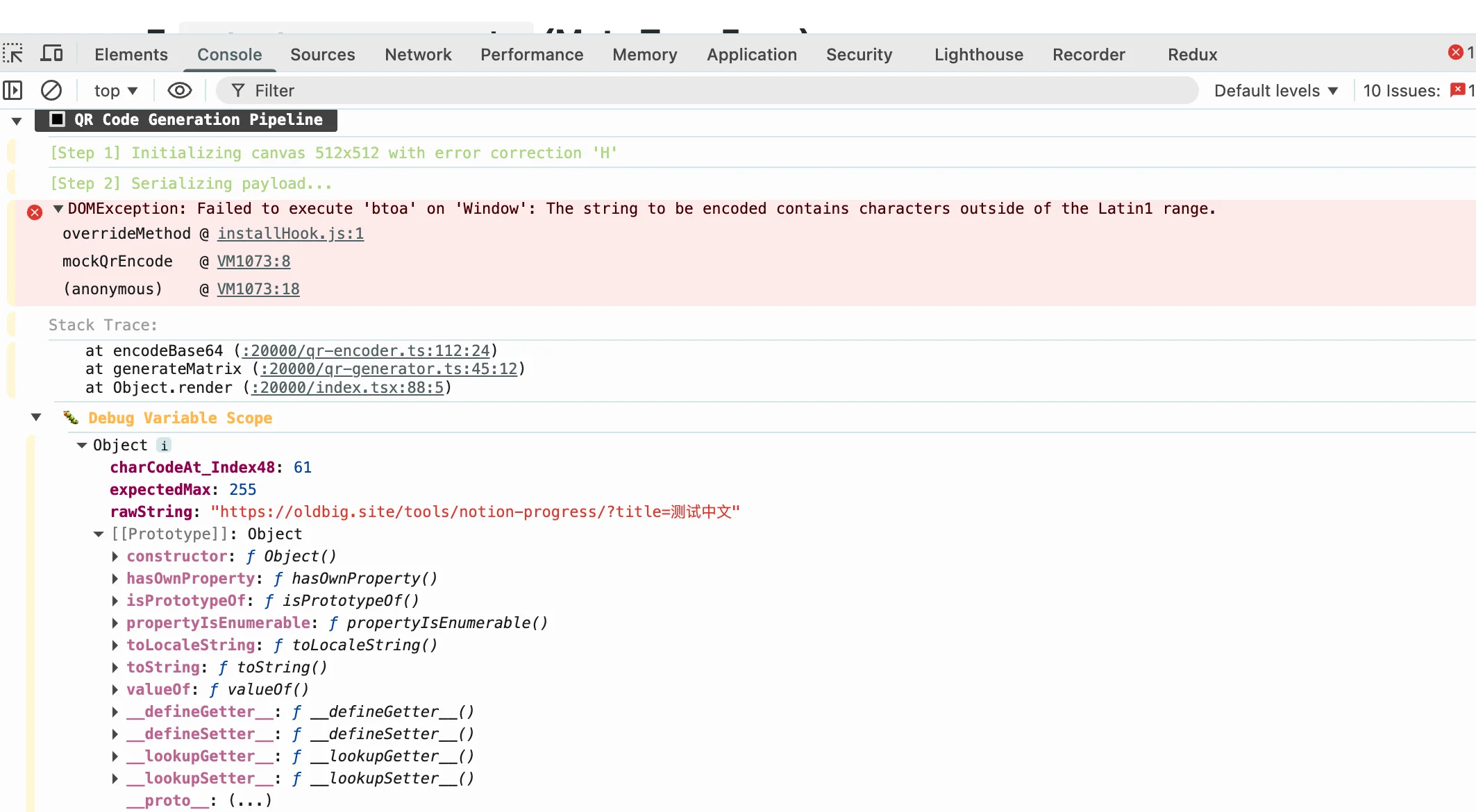
btoa crashes on non-Latin1 characters. Had to bring in a dedicated encoding library to fix it.QR code generation uses the qrcode library in JavaScript. The library handles all the encoding logic—the error correction levels, the matrix generation, the pattern placement. I'm not doing anything clever with the codes themselves.
Export formats: SVG for vectors (scales to any size without blur, great for print), PNG for raster (standard digital use), WebP for web (smaller file size). If you need something specific, file an issue on GitHub.
Common Questions
Can I use this for commercial projects? Yes. QR codes themselves are public domain. Do whatever you need with the codes you generate.
How much can I encode? Theoretically 4,296 characters of data. In practice, keep it under 500 characters for reliable scanning on most phones. The more data, the denser the code, the harder to scan.
My QR code won't scan.Usually size (too small) or contrast (not enough difference between dark and light modules). Try increasing output size first. If it still doesn't work, you might have too much data encoded.
Does it work offline? Yes. After the page loads, all the JavaScript runs locally in your browser. No network requests after initial page load.
Written by Bai Shuang, a full-stack engineer with 16 years of Java/JavaScript experience, 10 years of Scala, and 8 years specializing in privacy-focused tools.
GitHub: @oldbig. Open source project: redux-lite - A lightweight React state management solution.